
What is Block and Stack Planning?

Updated: May 8
Block and Stack planning sounds simple. On the face of it, the stack is a building, the block is a team. Rearrange some blocks across some floors in your building and voilà! Job done.
Well, it turns out there is a bit more to it than meets the eye. Capturing your current team allocations is the easy bit. Scenario-planning the complicated moves required to reach a new end state for your office restack is a nuanced and disciplined affair. It has to be, because once you start moving teams around you can set off a chain reaction, and it is all too easy to lose the thread of team desk allocations. This type of workplace planning is unforgiving to mistakes. Moving teams around needs to be handled with absolutes. A team needs to know exactly how many desks they are being allocated, and the whole exercise quickly unravels if those desk allocations are not accurate. Ideally this task is completed with Block and Stack software, but most of the time it is managed through spreadsheets and PowerPoint…
This blog post sets out what Block and Stack planning is, what it involves, what it produces, and where it tends to go wrong.

What is Block and Stack planning?
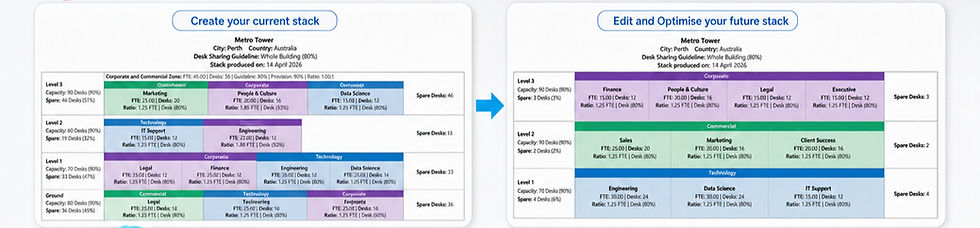
Block and Stack planning is a visual, data-driven way of allocating teams (the blocks) to floors or neighbourhood zones within a building (the stack).
It supports workplace strategy development and detailed space planning. Strategy answers how do we want to work? Detailed space planning answers where exactly does each desk go? Block and Stack planning sits in between, and by knowing where the teams will go and what their desk allocations are, it helps to really answer another key question: how much space do we need?
That is the question that drives lease decisions, business cases, fit-out budgets, and relocation timelines. It is also the question most organisations struggle to answer with confidence, because the planning process is often still done manually, and because the underlying complexity is rarely properly understood.
What is a Block? What is a Stack?
A Block is a team. It is defined by its team name, if possible, the function or division it belongs to, its people metrics (headcount or FTE), and the number of desks it has been allocated.
Blocks aggregate up. A team belongs to a function or division. When you make changes to a stack, you are not placing teams randomly. You are placing them in a way that keeps them grouped with their function or division as much as possible. A Finance function scattered across multiple floors will be viewed as sub-optimal by the business, even if every Finance team has a desk.
A Stack is the building, broken down by floor and (in some cases) by neighbourhood zone. Each floor has a known desk capacity: the maximum number of desks that floor can physically accommodate. It does not include meeting rooms, breakout spaces, circulation, and other non-desk uses. Depending on your approach you can include private offices in your desk count, treat them separately, or exclude them from your stack.
Each floor may also be divided into Neighbourhood Zones, which are designed to pool a greater number of desks, so that in a desk sharing environment employees have access to this greater pool of desks instead of just what is allocated to their teams. This economies-of-scale effect greatly supports desk sharing and is especially popular in Activity Based Working (ABW) environments.
Right at the start of any Block and Stack exercise, there is a fork in the road that fundamentally influences everything that follows: is the organisation operating in traditional mode (one desk per person, assigned seating) or desk sharing mode (with sharing ratios)? The answer dictates how rules and constraints are then applied to the stack, and also whether neighbourhood zones are available (only in a desk sharing environment).
Why is Block and Stack planning more complicated than it looks?
A stack is not a flat list of teams on floors. It is a set of nested layers, each one inside the next, like concentric rectangles.

There are five layers:
Layer 5: The Building. The outer container. The whole stack sits inside it. It can also display an optional desk sharing % guideline, e.g. the whole building shares at 80% (10 people to 8 desks).
Layer 4: The Floor. Each floor has a desk capacity, and an optional custom desk sharing percentage.
Layer 3: The Neighbourhood Zone. A sub-area within a floor. Conditional, not always present.
Layer 2: The Function or Division. The parent grouping that teams belong to.
Layer 1: The Team. The block itself.
When something changes, the change cascades through these layers. Take a worked example. A new team (Data Science) with 40 people is added to the building, sharing at 1.25 people per desk, or 80%, so 32 desks required. They belong to the Technology division. The cascade runs:
Layer 1 (Team). The Data Science team is created with 40 people and 32 desks needed.
Layer 2 (Function/Division). The Technology division grows. Its overall footprint could potentially be across multiple floors.
Layer 3 (Zone). If the building uses Neighbourhood Zones, will Data Science join a zone or not?
Layer 4 (Floor). Which floor has at least 32 spare desks of capacity? If no single floor does, the team needs to be split across multiple floors or accept fewer than 32 desks and therefore be in breach of the 80% desk sharing guideline.
Layer 5 (Building). The building's overall utilisation updates. The change may push it past a threshold that triggers a different conversation entirely about whether more space is needed.
A single 40-person addition has touched all five layers. That cascade is what makes Block and Stack planning interconnected and more complicated than it first appears, and it is why getting any one layer wrong has consequences for the others.
Of the five layers, four are always present. Layer 1 (Team), Layer 2 (Function/Division), Layer 4 (Floor), and Layer 5 (Building) cannot be skipped. In most organisations the org chart will show the relationship between team and function or division. Every team is on a floor. Every floor is in the building.
Only Layer 3, the Neighbourhood Zone, is conditional. There is no benefit to having a neighbourhood zone in a traditional one-person-to-one-desk environment, which is why zones only exist in a workplace with a desk sharing way of working, and even then, they are optional. Some teams on a zoned floor sit inside a zone. Others sit on the floor outside the zone. Some zones have their own pool of spare desks, ring-fenced from the floor's spare desk pool. Others do not. This is precisely the kind of detail that can catch you out when planning things manually on a spreadsheet.
There can also be a sixth layer: the portfolio, where there are multiple buildings and teams move not just between floors but between buildings. This layer introduces an even greater level of complexity and will be a topic for another post in the future.
What does Block and Stack planning actually involve?
A real Block and Stack planning exercise is aiming to accommodate the needs of the business but also be sophisticated enough to develop scenarios not asked for, but which provide a more optimised result. The pursuit of the "perfect" stack layout is likely a fool's errand, because the very definition of perfect will be different from person to person. One Executive might have a strong view that does not align with a mathematically optimised stack, especially if you have just moved them from the top floor to make way for another team!
A good way to understand what is involved is to understand the main features:
Moving a team. Easy to imagine from one floor to another. Move Finance from Level 3 to Level 5. But behind that single move sits a range of checks and balances that ripple through the stack. The check on Level 5's remaining capacity, the impact on Finance's function-level coherence, the effect on Level 3's spare desk pool, and any zone allocation changes on either floor. The simple Move feature, the bedrock of Block and Stack editing, is actually performing a recalculation across every layer.
Splitting a team. When no single floor can hold a team, or you just want to split a team for business reasons, the team can be split across two or more floors. A split is its own operation, not just two moves, because it has to be deliberate (which sub-group goes where), proportionate (how many desks on each floor), and recoverable (so the split can be reunited later when capacity allows).
Reuniting a team. The closing of a previously split team. This is its own operation because it requires the tool to understand that Finance on Ground and Finance on Level 1 are technically the same team. Reuniting is not the same as moving the smaller group back. It is restoring the entirety of the team, which could be many blocks, into one single team block.
Swapping two teams. When two teams are in the wrong place relative to each other, the cleanest fix is one swap, not two sequential moves. A swap procedure has to satisfy every constraint on both sides simultaneously. A two-move sequence introduces a transient state where neither team has a valid home, which is fine in theory but error-prone in practice.
Co-locating teams. Some teams must be together. Legal and Compliance. Executive and Executive Support. Trade desks and Risk. Co-location rules anchor groups of teams so their adjacency needs are met, and any future moves can either move them together or flag that their co-location desire is about to be broken.
Auto Stack. By the time Block and Stack planning is needed, it is usually because the real-life building has developed organically over a number of years. There are a broad range of inefficiencies, business needs, and knowing what to unpick first becomes a challenge. This is where an Auto Stacking feature comes in handy. Within seconds, a good one will let you set your constraints (e.g. Team X cannot move, keep the co-location relationships) and then automatically reorder your teams into a mathematically more optimised stack. This might be enough; the layout might tick all your boxes. But it is more likely that what it produces is a much better starting position for you to then apply the final touches. Think of it as getting you 90 metres further forward in a 100-metre race.
A good visual way to test if the Auto Stacking feature has delivered a good result is whether the team blocks for each Function/Division are grouped together as much as possible. Also, have the disparate groups of spare desks that were not helping anyone been brought together as much as they can, so you can give a floor back or introduce a new team to Level 2 for example?
Function/Division grouping is also why Work Stack's colour scheme is not at team level, but at Function/Division level. The user's eye should land directly on the answer to the real question: are the teams grouped together in a way that makes business sense?
Who does Block and Stack planning?
Block and Stack planning is rarely owned by a single role. It usually involves a small group of people who each bring a different lens.
Space planners focus on the physical fit. They know the floors, the desk capacities, the constraints of each space. They make sure the plan is physically deliverable, not just logically sound.
Workplace strategists benefit from the outputs, as they test new ways of working and different scenarios. They translate workplace strategy into the stacking principles, sharing ratios, and adjacency rules that drive the plan.
Property and portfolio managers care about the building-level and portfolio-level outcomes: utilisation, lease commitments, surplus and deficit at floor level, and the financial implications of consolidation or expansion.
HR and business unit leads bring the people metrics view: who is growing, who is restructuring, who must sit near whom, and what the political realities are.
Facilities and change management are usually involved during the execution of office restacks or relocations, so they need a clear understanding of the future state.
Each discipline contributes something different and is looking for something different, and the Block and Stack can service all their needs. To be honest, you do not even need to be a workplace specialist to create a Block and Stack. Anyone who understands their organisation and has access to HR data and an org chart can build one in minutes.
What is Block and Stack planning used for?
Block and Stack planning shows up in a handful of recurring scenarios:
Office restack planning. Reorganising teams within an existing footprint to improve adjacencies, function coherence, and utilisation. This is where the discipline earns its keep most often. The trigger is usually a build-up of incremental moves over time that have left the building operating inefficiently.
Right-sizing space. Do we have too much space? Too little? Can we exit a floor, consolidate, or sublease? The trigger is usually a lease event or a balance sheet review.
Office relocation planning. Planning who goes where in a new building before the move happens. The trigger is a confirmed move date and a new building floorplate that does not yet have teams allocated.
Testing scenarios. Growth, contraction, hybrid recalibration, restructure, M&A integration, return-to-office shifts. Block and Stack is how you stress-test each scenario before you commit. The trigger is uncertainty, not a specific event.
Supporting early decisions. Before architects, before test fits, before capex, before change fatigue sets in. The earlier the Block and Stack, the cheaper the decision. The trigger is usually the first time someone in the business asks "is our current space still working?"
What goes into a Block and Stack?
Less than people expect. You really only need three things:
People metrics by team in the org structure. Headcount or FTE for each team, mapped to its parent function or division.
Confirmation of ways of working. Desk sharing mode or traditional mode. If desk sharing, the sharing ratios.
Building knowledge. How many floors. The desk capacity of each floor. Any zones, if applicable.
Armed with just those three inputs and the right tool, you can build a Block and Stack in minutes.
What you do not need at this stage is detailed seating plans, architectural drawings, change management strategies, or finalised growth forecasts. A Block and Stack is a planning instrument, not a final design. It works with the data you have, and it improves as the data sharpens.
What comes out of a Block and Stack?
A finished Block and Stack produces:
A clear visual of the current state and also the future state, colour-coded by function or division.
Surplus or deficit indicators at floor and building level, e.g. teams in breach or scattered spare desks.
A logic trail that an executive can follow.
A defensible base for business cases, lease decisions, design briefs, and change communications.
Work Stack adds one more output that is very useful: a Restack Planner. Once you have finalised your future state, the Restack Planner compares it against your current state and maps every move. Finance moves from Ground to Level 1. They will need 96 desks. They will join the Corporate Neighbourhood Zone.

What Block and Stack planning is not
It is not a detailed test fit. It is not a final seating plan. It is not an architectural drawing. It is not a change management plan, although it informs one.
Block and Stack planning answers how are we organised today, and could we be organised better in the future?
Where does Block and Stack planning often go wrong?
Most Block and Stack failures fall into a small number of recurring patterns.
Attempting to follow the bouncing ball of complexity using spreadsheets and PowerPoint alone. It works up to a point, then it does not, and by then the data has drifted from reality.
Not being disciplined with your people metric data. This is the one variable that will constantly shift and change. The headcount or FTE of a team and its desk allocations can fluctuate constantly during the early stages, especially when team managers over-inflate their desk number requirements!
Paying for bundled software that includes a very basic Block and Stack module, when the module is not capable enough for you to actually achieve your goals.
Frequently asked questions
How long does a Block and Stack exercise take?
Simply, if you have collected the data you need upfront (building data split by floors, number of desks available, divisions, teams, people metrics, team locations on the floor), then a Block and Stack can be built in minutes. Something that would take hours doing manually. Once you start running scenario testing, you get results in seconds that could have taken a team weeks to develop manually. Plus, the data is accurate. The days of human error causing the spreadsheet headcount to drift away from reality and only finding out after the plan has been approved, are gone.
What is the difference between a Block and Stack and a test fit?
A Block and Stack is a planning exercise. It tells you which teams sit on which floors, in which neighbourhood zones, and how many desks they need. It works at the level of teams and floor capacities, not actual furniture. A test fit is part of early design thinking. It takes a specific floor and tests, on a real floorplate, where the desks, meeting rooms, breakout spaces, and amenities physically go. The Block and Stack tells you that Finance needs 96 desks on Level 1. The test fit tells you exactly where those 96 desks sit on Level 1.
Do you need software to do a Block and Stack?
No, but you will struggle without it. Spreadsheets, PowerPoint, and AI can produce the initial Block and Stack, but they make iteration painful, scenario comparison slow, and constraint management manual. Purpose-built tools turn it into minutes and hours, not weeks.
Is Block and Stack planning the same as space planning?
No. Space planning is the broader discipline that includes Block and Stack as one stage, and test fits as another. Block and Stack is the bridge between strategy and detailed design.
Can Block and Stack planning be done across multiple buildings?
Yes, this is portfolio-level Block and Stack, where teams move not just between floors but between buildings. It adds a sixth layer of complexity and is a topic for a future post.
In closing
I have been doing workplace transformation and strategy for more than fifteen years, and Block and Stack planning has been at the heart of nearly every project. The complexity is real, but it is manageable, provided the tool you are using has been built by someone who actually understands the work.
I built Work Stack because the existing options were either too manual (spreadsheets and PowerPoint) or too heavy (full enterprise platforms with modules you do not need). Work Stack sits in the middle. It is a powerful Block and Stack engine, free to anyone who wants to visualise their team allocations in a building. Also, at the time of writing (May 2026), AI cannot yet keep track of the changes and iterations to make it a viable alternative.


